Biopac Science Lab Line In Ports
The Biopac Science Lab MP40 unit connects to the computer via Line-In.
Important—Audio line-in is not the same as headphones. Typical audio line-in connectors are shown below for Windows and Mac:
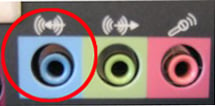

If a computer does not have a built-in Line-In jack, an external audio adapter can be used.
BIOPAC Systems, Inc. has reviewed five external sound adapters. All of the reviewed adapters are compatible with the MP40 unit, but their ease of use and signal quality vary. The reviewed audio adapters have the following specifications in common:
-
Interface with a computer via USB port
-
Retail for approximately $70.00 or less
-
Self-powered
-
Plug and play with default drivers on Microsoft OS/Mac OS and thus do not require an installation procedure or proprietary driver.
-
Performance differences are detailed here to help users make an informed choice based on their needs.
See the Audio Adapter Compatibility Review for details.
Associated Disciplines
WHAT'S NEW
Biology research covers a wide variety of studies all aiming to understand living organisms...
Stay Connected