Watch the Video Overview of some of the newest User Interface Features!
Fully Customizable Recording!
Configure detailed recording protocols with analog, digital, and calculation channels. Easily select and set up your recording channels simply by choosing your amplifiers from the module list. Select from dozens of preconfigured preset calculation channels such as heart rate, respiration rate, flow, volume, dP/dt, and more! Plus, create additional presets and save them for further use.
AcqKnowledge has user-selectable acquisition modes (including averaging), sample rates, durations, and automation. Graph windows are also completely customizable allowing multiple views of the same data. Rearrange toolbars, add custom buttons for analysis routines or transformations, change the color or size of waveforms, grids, backgrounds, text, and more!
With AcqKnowledge, record from multiple hardware devices at the same time! Record from multiple MP150’s, an MP150 and MP36R, B-Alert and more!
Windows Only – Take advantage of the integrated Media functionality to synchronize your data file to a video recording from a webcam or other camera system. The video and data file will be locked together for playback, allowing the user to simply scroll through either the video or data file and be taken to that same point linked in the corresponding file.
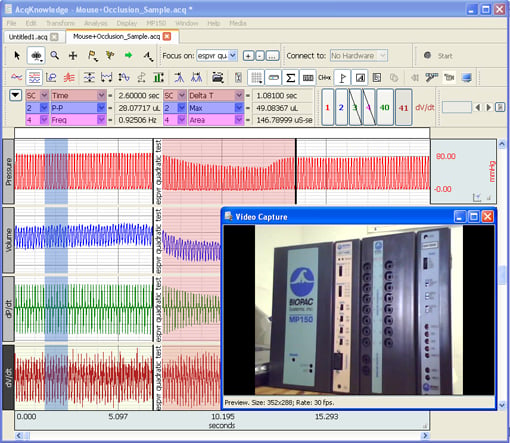
During recording, select from dozens of available preset channels both for amplifiers and calculation channels. Spend less time on set-up, and get from recording to reporting using AcqKnowledge’s powerful suite of analysis routines.
Use the scaling tools to customize the divisions and scaling of both the horizontal and vertical axis. Fully customize the divisions, color, and scaling of the channel grids and save presets for the grid settings used most often (ex: ECG grid).
Working with hardware or software from another manufacturer? No problem, AcqKnowledge has import and export features that work with a wide variety of data formats including MatLab, Text, Excel, Noldus Observer XT, and SMI BeGaze.
Stimulation—AcqKnowledge can output a range of stimulus paradigms for constant current and constant voltage stimulation. It accepts digital events from virtual reality environments and stimulus presentation systems such as E-Prime, Presentation and SuperLab and categorizes them for further analysis. Easily configure single pulses, arbitrary waveforms, and pulse chains for stimulation!
Targeted Analysis
Take advantage of fully automated analysis routines created to save you time. For ECG data utilize the automated HRV analysis, or locate and mark ECG complex boundaries for both human and animal signals. Take advantage of multiple routines available for EEG, EDA, EMG, and Respiration. Look at RSA or perform a detailed ICG analysis with a few clicks of the mouse. Routines are available for most physiological signals! Further target analysis by creating Focus Areas. Select areas of interest within the data file, and mark them as focus areas. Then, simply choose an analysis routine and run it on the Focus Areas only, as opposed to the whole file!
Watch AcqKnowledge Tutorial Screencasts to learn more now.
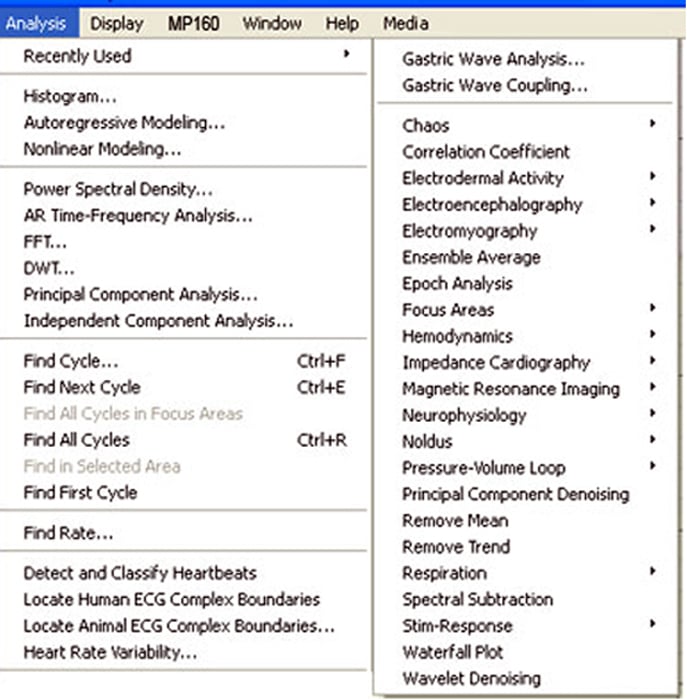 AcqKnowledge also has a wide variety of simple transformations and filters available for use as well. Filter both during recording or after, find Rates, Cycles, and take multiple measurements over selected data areas. Perform FFTs, and other spectral analyses over selected areas of data or the whole file. Create and evaluate expressions, use the detailed find cycle tool and export results to the journal, as an Excel spreadsheet, 3D plot, and more!
Industry Leading Support
Have a question about the software, or an analysis routine? BIOPAC provides a wide variety of support tools at your fingertips! A detailed software guide, dozens of software video tutorials, application notes, and the knowledge base provide instant answers. If more information is needed, BIOPAC’s technical support team can provide help by phone or email.
Newest features in AcqKnowledge include…
- Automatic fixed delay option for NIBP100D when BioNomadix is being used
- Easily open scripts from within AcqKnowledge
- Arbitrary wave stimulation for MP36R units (output an arbitrary wave similar to the arbitrary wave output for MP150 stimulator)
- Access About panel from the Startup Wizard
- Determine file version in scripting
- Extract file details from the OS
- Disable closing of Check Impedance Control Panel while the check impedance is in progress.
- Sweep display mode during acquisition added
- Toggle visibility of individual PV loops and of fitted slopes in Pressure-Volume Loop analysis
Product Family
Product Type
Product Options

Unmatched Power & Flexibility
Automated analysis for ECG, HRV, EEG, EMG, EGG, and many more. Compatible with major manufacturers’ data formats.
Intuitive, Elegant Interface
Enhanced user interface and menus simplify operation. New Measurement Result Mouse-Overs. Quick-Start Templates.
Designed for Discovery
Applicable to over 40 academic research fields, plus neuromarketing & commercial applications.

Stay Connected